


As the microservice buzzword catches up, I believe sooner or later you might think of trying microservices. In this blog post, I shall cover some of the common problems related to routing and load balancing and how to get around them using HAProxy.
Routing Using HAProxy
Imagine you have a project that creates task list for a logged in user.
I can think of two entities:
- User
- Task
So now you will have two services:
- User Service
- Task Service
Both (User/Task) provide API for basic CRUD operations. Now on the frontend, you will have API calls like this:
Microservice: 1 hosts the Task Service.
GET http://<your-machine>:8081/tasks/get
GET http://<your-machine>:8081/tasks/get/{id}
POST http://<your-machine>:8081/tasks/ + payload
PUT http://<your-machine>:8081/tasks/ + payload
…and so on.
Microservice:2 hosts the User Service.
GET http://<your-machine>:8082/users/get
GET http://<your-machine>:8082/users/get/{id}
POST http://<your-machine>:8082/users/ + payload
PUT http://<your-machine>:8082/users/ + payload
…and so on.
The problem here is, the API exposes a few things to the frontend. You are running microservices on 8081 and 8082. Thus frontend should be aware of these ports. As you go on adding more microservices, you will need to open up as many ports. For example, if there are 25 microservices, then you need to open up 25 ports!
In short, this is a routing problem.
We can get around this using a load balancer HAProxy. Here’s how:
- Install HAProxy, where you host your microservices.
sudo add-apt-repository -y ppa:vbernat/haproxy-1.5 sudo apt-get update sudo apt-get install -y haproxy
- Post installation open /etc/haproxy/haproxy.cfg for editing.
1#Define the accesscontrol list and its rules.
2frontend localnodes
3#Bind the rules,only to request coming from 9000 port.
4        bind *:9000
5#Applicable to only http request.
6        mode http
7#Bind url_tasks to all request having signature /tasks.
8        acl url_tasks path_beg /tasks
9#Bind url_tasks to all request having signature /users.
10        acl url_users path_beg /users
11        use_backend tasks-backend if url_tasks
12        use_backend user-backend if url_users
13
14backend tasks-backend
15  mode http
16  balance roundrobin
17  option forwardfor
18#forward all request having signature /tasks to microservice running on localhost 8081
19  server web01 127.0.0.1:8081 check
20
21backend user-backend
22  mode http
23  balance roundrobin
24  option forwardfor
25#forward all request having signature /tasks to microservice running on localhost 8081
26  server web01 127.0.0.1:8082 check
A sample configuration will look like this.
- After making the configuration change, restart the HAProxy service:
sudo service haproxy restart
Here is a pictorial view of the problem and the proposed solution using HAProxy. All the ports are open for frontend to make API calls as below:

After using HAProxy:

Advantages of Using HAProxy
- Frontend does not need to know which services are running at which port.
- Only a single port needs to be open. Frontend will hit that port with the signature. HAProxy will forward it to the correct microservice using the mapping written in the configuration.
Load Balancing Using HAProxy
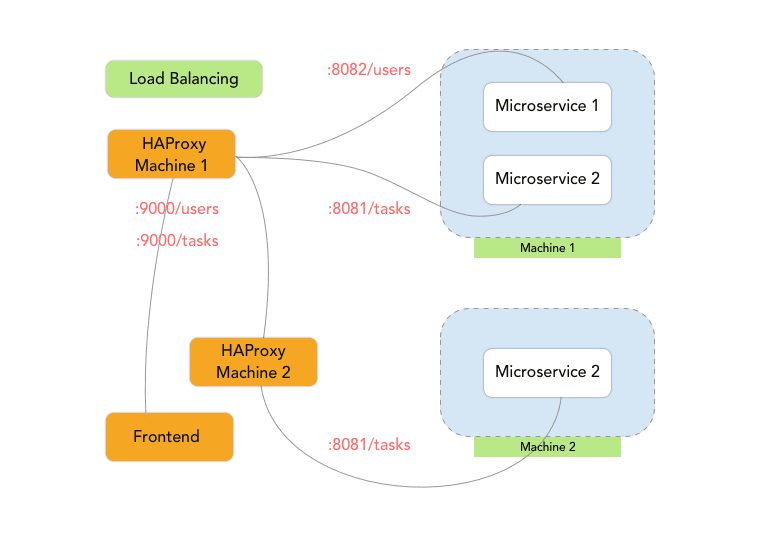
Imagine you have a high number of requests coming to Microservice:1 {Task Service}. Due to the number of requests, you have to do some load balancing.
- Spawn up a new server to host Microservice:1 {Task Service} on Machine 2. Now we have something like this:
Machine 1
Hosts
Microservice:1 {Task Service} runs on port 8081
Microservice:2 {User Service} runs on port 8082
Machine 2
Microservice:1 {Task Service} runs on port 8081
- Install HAProxy on Machine 2.
- Open /etc/haproxy/haproxy.cfg for editing.
- Add routing configuration as below:
1#Define the accesscontrol list and its rules.
2
3frontend localnodes
4
5#Bind the rules,only to request coming from 9000 port.
6
7bind *:9000
8
9#Applicable to only http request.
10
11mode http
12
13#Bind url_tasks to all request having signature /tasks.
14
15acl url_tasks path_beg /tasks
16
17use_backend tasks-backend if url_tasks
18
19backend tasks-backend
20
21mode http
22
23balance roundrobin
24
25option forwardfor
26
27#forward all request having signature /tasks to microservice running on localhost 8081
28
29server web01 localhost:8081 check- On Machine 1, add routing configuration as below to map it with the newly added microservice on Machine 2:
1backend tasks-backend
2  mode http
3  balance roundrobin
4  option forwardfor
5#forward all request having signature /tasks to microservice running on localhost 8081 or on machine 2 in round robin
6  server web01 127.0.0.1:8081 check
7  server web02 MACHINE_2_IP:9000 check
This ensures request is forwarded in a round robin pattern. The first request to
GET http://<machine1>:9000/tasks/get will get forwarded to http://<machine1>:8081/tasks/get.
The second request to GET http://<machine1>:9000/tasks/get will get forwarded to http://<machine2>:9000/tasks/get and so on.
Advantages of Using HAProxy
- HAProxy provides high availability and scalability.
- Multiple load balancing algorithms are available.