


Salesforce business users may have been long waiting for a business solution for notifications. Whether it is Chatter notifications, Bell notifications, or the regular email alerts, every time a new scenario or change is needed, they must wait for developer or admin support to code in the change and configure the system. And tracking of notifications for a particular record is nothing less than a hunting job. The Notification App is an answer to these long-standing problems.
With the Notification App for Salesforce, you can:
- Set up notifications rapidly
- View notifications on record detail page
- Get an overview of notifications on a dashboard
- Track notifications easily
- Customize location of notification display
Simple Notification Setup
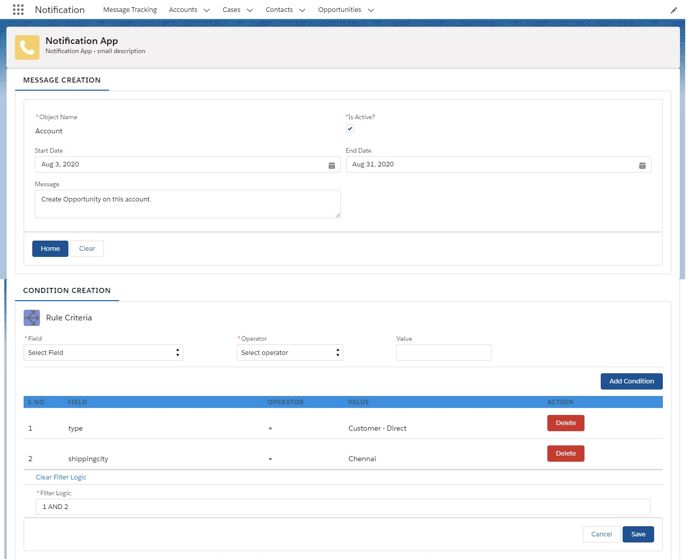
Notification App takes away the dependency on Salesforce administrator/developer and allows you to set up custom notifications with a few clicks. It has a simple user-friendly interface with input boxes for associated Salesforce objects, notification display message, start/end dates, filter logic, and a few additional fields to define rules (See Fig 1). Object-related fields are populated dynamically, eliminating the worry of identifying the fields for manual input. Creating new notifications takes a few minutes at the most.
Comprehensive Notification Dashboard
The notification dashboard gives you the number of active/inactive records that qualify for notifications along with the message and object on the notification dashboard. You can edit or delete messages and toggle between active and inactive messages. You can also get a filtered view using Object name and Status filters. These give you a snapshot of the information you need to start your day. You can set up a new notification with conditions any time by just clicking the New button at the top right corner of the dashboard (Fig. 2).

Easy Notification Tracking
Do you have a tough time tracking notifications for each record? Notification App offers a way out of that little problem. Notifications are displayed on the detail page of the record itself (see Fig 3). These notifications are displayed in a carousel (See Fig 4), which allows any number of notifications to be displayed on the same page, so you don’t lose time tracking down a particular notification.


Flexible Notification Components
The default system does not allow users to change the position of their display notifications on the record detail page. Notification App provides a solution for this. Using Lightning App builder, you can add the message display component to the record detail page (Fig 5) and change its location and size as per your preference using simple drag-and-drop. You can thus make more effective use of the available space on the record detail page.

Notification App is compatible with both Classic and Lightning environments. You have the choice of running the app without losing a single feature in Classic.
Download Notification App from AppExchange.