

How quickly new employees become productive depends on how soon they get access to the systems their roles require.
For a global retailer operating 12 departments across 50 locations, manual Salesforce user provisioning slowed employee onboarding and increased the burden on IT. They needed a scalable solution to simplify access management while maintaining security and control.
We addressed this challenge by integrating Salesforce with the retailer's existing Microsoft Azure Active Directory (now Microsoft Entra ID) environment. SAML-based Single Sign-On (SSO) and automated provisioning gave the retailer a way to manage access centrally and get new employees on Salesforce faster.
What's in this article:
- How we simplified onboarding and access management through SSO and automated
provisioning for a global retailer - How pairing scheduled Azure AD synchronization with a custom Salesforce Apex Just-in-Time (JIT) handler eliminated provisioning delays
- How department and title attributes inside SAML assertions automatically map users to the right Salesforce profiles, roles, permission sets, and licenses
- How establishing Azure AD as the single identity control plane created a reusable federation pattern for downstream systems like custom order management
The Solution: Centralized Identity on Existing Azure AD Infrastructure
Because the retailer already relied on Microsoft Azure Active Directory as its corporate identity platform, we anchored the solution on existing infrastructure rather than adding a standalone identity governance system.
The solution combined three capabilities:
- Single Sign-On (SSO): Employees sign in to Salesforce using their existing corporate credentials, eliminating separate Salesforce usernames and passwords.
- Automated User Provisioning: Azure AD automatically creates and updates Salesforce user records, removing manual account setup.
- Role-Based Access Automation: Salesforce assigns user profiles and roles dynamically using predefined department-specific rules, enforcing consistent permissions across all locations.
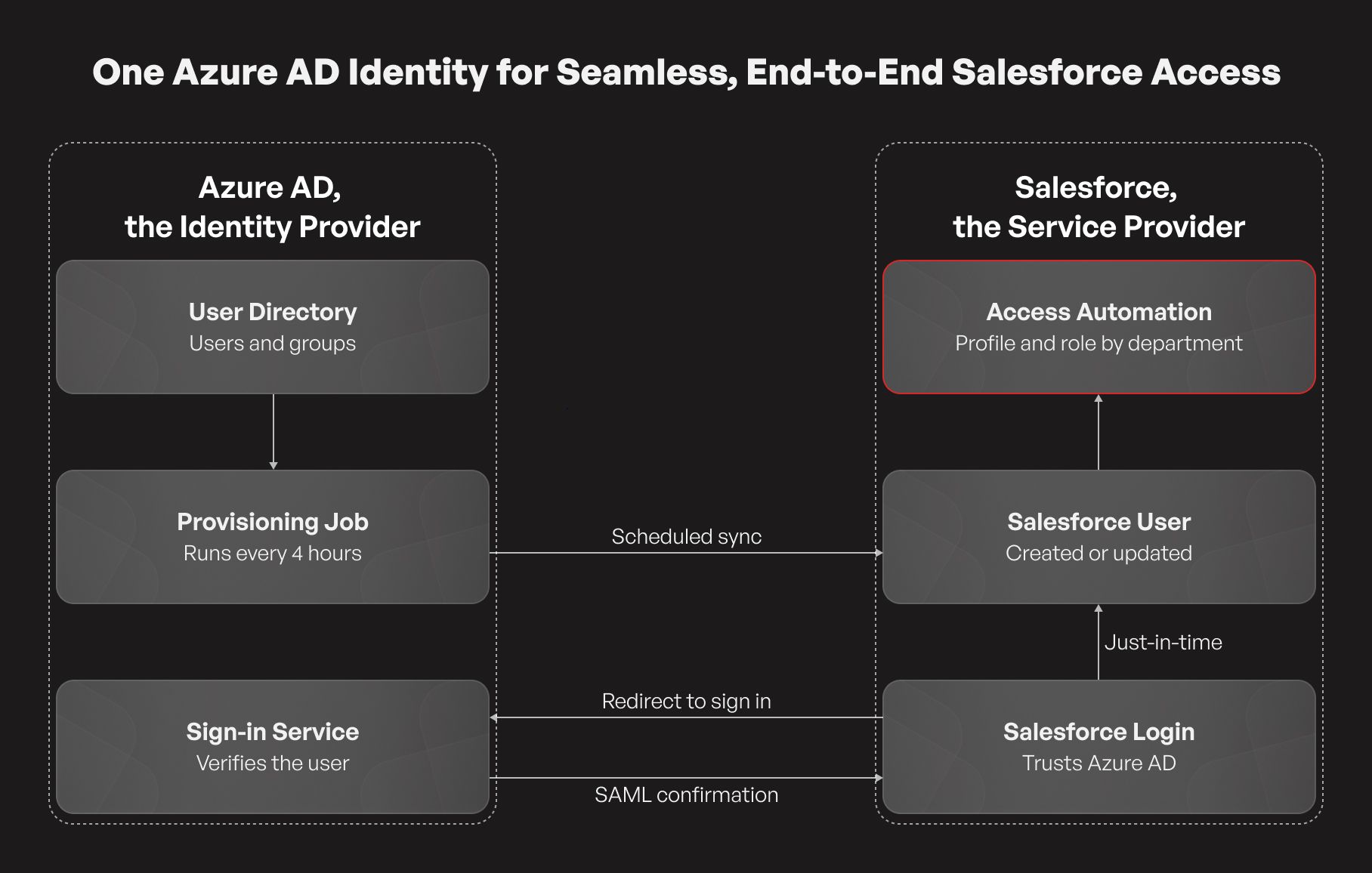
The solution integrates Microsoft Azure Active Directory (acting as the Identity Provider) with Salesforce (acting as the Service Provider) using Security Assertion Markup Language (SAML) for secure authentication and automated provisioning.
When an employee accesses Salesforce, the application redirects them to Azure AD to verify their corporate credentials. Upon authentication, Azure AD sends a SAML assertion back to Salesforce containing key user attributes. Salesforce matches the incoming assertion to the corresponding user account via the Federation ID, mapped directly to the employee’s corporate email address, and grants access.
This architecture centralizes authentication in Azure AD while giving employees a single, consistent sign-in experience.
How Azure AD and Salesforce Automate User Provisioning
Relying solely on scheduled directory syncs can leave new hires waiting for the next batch cycle before they can log in, while relying exclusively on login-triggered provisioning does not update user records when roles change later. To cover both immediate access and ongoing synchronization, we implemented two complementary provisioning mechanisms.
Custom Just-in-Time (JIT) Provisioning
Just-in-Time provisioning enables Salesforce to create a user account at the exact moment an employee signs in through Azure AD for the first time. Azure AD passes required user attributes—including name, email, and department—inside the SAML assertion, which Salesforce uses to build the user record. Salesforce uses these attributes to create the user record and assign appropriate access.
Salesforce supports two JIT provisioning approaches:
- Standard JIT: Uses attributes from the SAML assertion to create or update user records, including assigned profiles.
- Custom JIT Handler: Uses an Apex-based handler to apply business rules and dynamically assign profiles, roles, and other user attributes.
We implemented a custom JIT handler to evaluate each employee’s department attribute and apply department-specific profile and role mappings automatically at first login.
Scheduled Azure AD Provisioning
Azure AD provisioning complements JIT by creating and updating Salesforce accounts before employees even sign in.
The workflow involves three steps:
- Provisioning Configuration: Enables automated user provisioning within the Salesforce enterprise application in Azure AD.
- Attribute Mapping: Maps user identifiers and required attributes between Azure AD and Salesforce to ensure accurate account matching.
- User and Group Assignments: Defines which employees require Salesforce access through application assignments.
Azure AD synchronizes user information with Salesforce through scheduled provisioning cycles. If an authorized employee signs in before the next scheduled sync runs, the custom JIT handler creates their account immediately, ensuring zero delay while keeping records synchronized over time.
The Provisioning and Access Workflow
To ensure employees receive the exact permissions and licenses required for their jobs, we coordinated identity management and internal Salesforce automation into a four-step lifecycle:
- Centralized Onboarding: When a new employee joins, IT creates their corporate account in Azure AD and assigns them to the Salesforce enterprise application. Access eligibility is managed entirely in Azure AD rather than separately inside Salesforce.
- Automated Account Creation: Depending on timing, either the scheduled Azure AD sync creates the Salesforce user record in advance, or the custom Apex JIT handler provisions it upon first SSO login using the mapped directory attributes.
- Department-Based Access: During account creation or attribute updates, Salesforce evaluates fields such as Department and Title. The custom Apex JIT handler assigns the appropriate Salesforce profile and role based on predefined rules, while downstream automation allocates the necessary permission sets and feature licenses.
- Authenticated Application Access: Once the Salesforce account is provisioned and configured, employees can access the application using their corporate credentials through Azure AD SSO. Azure AD verifies their identity and passes the SAML assertion to Salesforce, which resolves the user via their corporate email Federation ID.
The same department-based access rules apply regardless of the provisioning mechanism used to create the account, helping maintain consistent access configurations across the organization.
Strengthening Governance Through Centralized Access Control
Automating provisioning also tightened security and auditability across the retailer's 50 locations:
- Centralized Access Decisions: IT administrators control who can access Salesforce through Azure AD application assignments, eliminating the need to manage access eligibility separately in Salesforce.
- Consistent Access Policies: Predefined department-based rules govern profile, role, and permission assignments, eliminating ad-hoc manual configuration errors.
- Improved Traceability: Centralized identity management and application records support access monitoring and audit activities.
Business Impact and Future Extensibility
Integrating Salesforce with Azure AD enabled the retailer to replace manual account management with a more scalable, automated process.
- Faster Employee Onboarding: New hires can access Salesforce from their very first sign-in without waiting for manual account setup.
- Reduced IT Workload: Automating account creation, role mapping, and license allocation freed IT teams from repetitive administrative tasks.
- Consistent Access Management: Department-based rules standardize Salesforce profiles and roles, reducing configuration errors across departments and locations.
- Simplified User Experience: Corporate SSO removed the friction of managing separate Salesforce credentials.
Beyond Salesforce, the implementation established a reusable identity architecture for the enterprise. Designed with future integrations in mind, this same Azure AD federation and attribute-mapping pattern provides a ready foundation for connecting additional business applications (including the retailer’s custom order management platform) without adding identity management complexity.
Still assigning Salesforce profiles and permissions by hand? You likely already own the tools needed to automate it. Talk to our Salesforce team for a quick look at your current onboarding workflow and where automated provisioning can cut admin overhead.