

Roll the same AI coding tool out across multiple engineering teams, and you may get code that looks completely different depending on who wrote the prompt.
Closing that gap requires moving from ad-hoc prompting to harness engineering: building a shared system of context management, deterministic guardrails, and automated evaluations around the model. In this piece, we break down the common failure patterns of unmanaged AI coding and how QBurst’s six-layer High AI Qatalyst framework standardizes multi-agent delivery.
What’s in this article:
- The three archetypes in unmanaged AI coding: the careful, trusting, and unaware
- How QBurst’s Qatalyst framework replaces ad-hoc prompting with repeatable standards
- The six architectural layers of Qatalyst
- How Factory.ai and Forward Deployed Engineers scale Qatalyst in production
- How an investment firm cut code-generation time by 51% leveraging Qatalyst
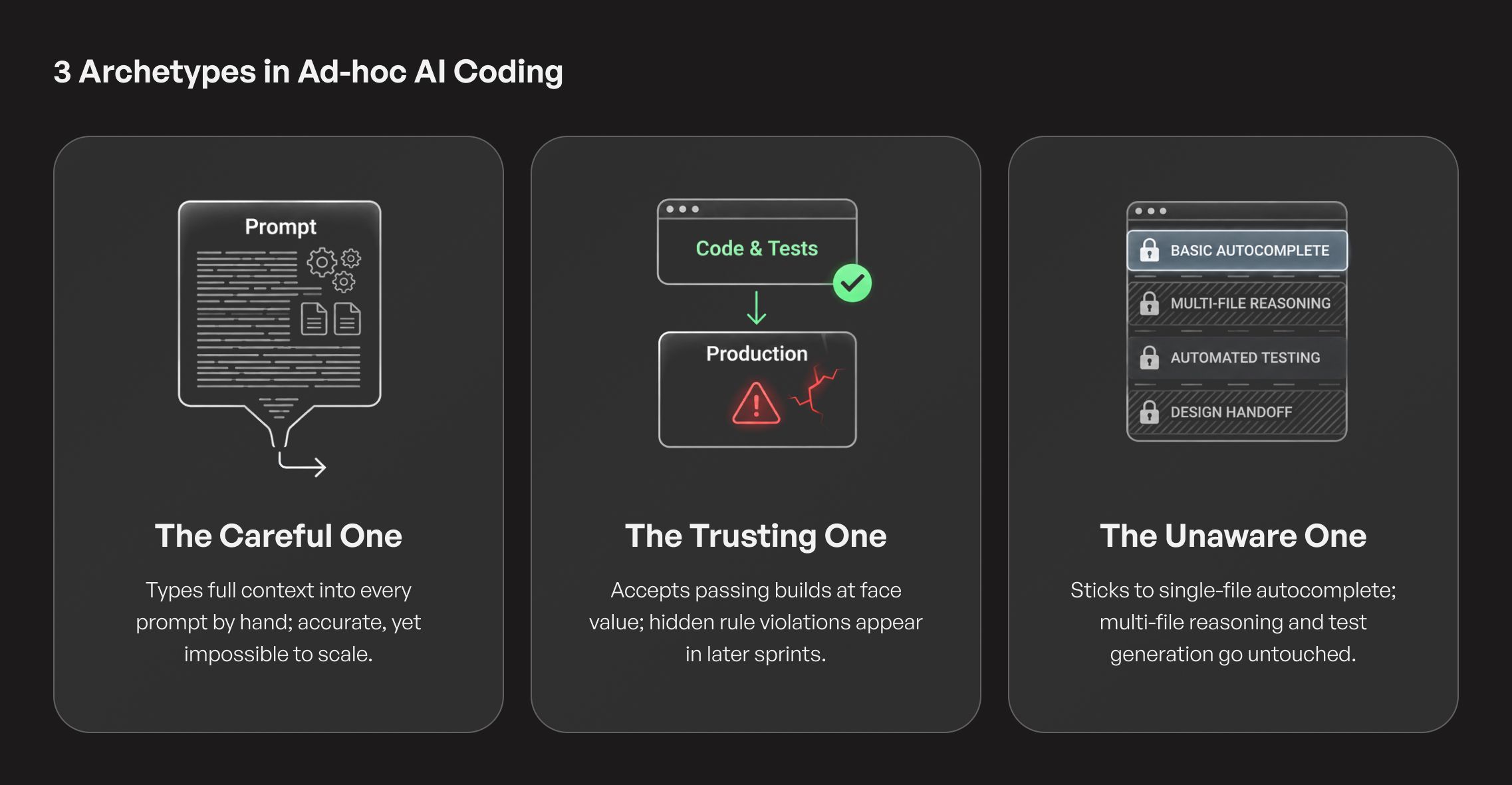
Without a shared way of working, engineering teams almost always fall into three archetypes: the careful, trusting, and unaware.
How Qatalyst Replaces Individual Developer Habits with a Shared System
Qatalyst puts a shared engineering system around the AI model so good output stops depending on who wrote the prompt. It gives every team the same context, rules, and workflows out of the box.
Placed side by side, the shift looks like this:
| Developer Archetype | Ad-Hoc AI Reality | The Qatalyst System |
| The Careful One | Hand-writes dependencies, rules, and acceptance criteria into every prompt. Accurate, but slow and unscalable. | Context is pulled automatically from project sources before the agent writes a single line of code. |
| The Trusting One | Ships whatever compiles, letting silent architectural violations and unoptimized queries hit production. | Automated rules and post-execution hooks block bad patterns before they ever reach a pull request. |
| The Unaware One | Treats AI like basic autocomplete, leaving multi-file workflows and test generation unused. | Specialized agents handle design, implementation, and unit testing as a standard pipeline. |
The Six Layers of Control in Qatalyst
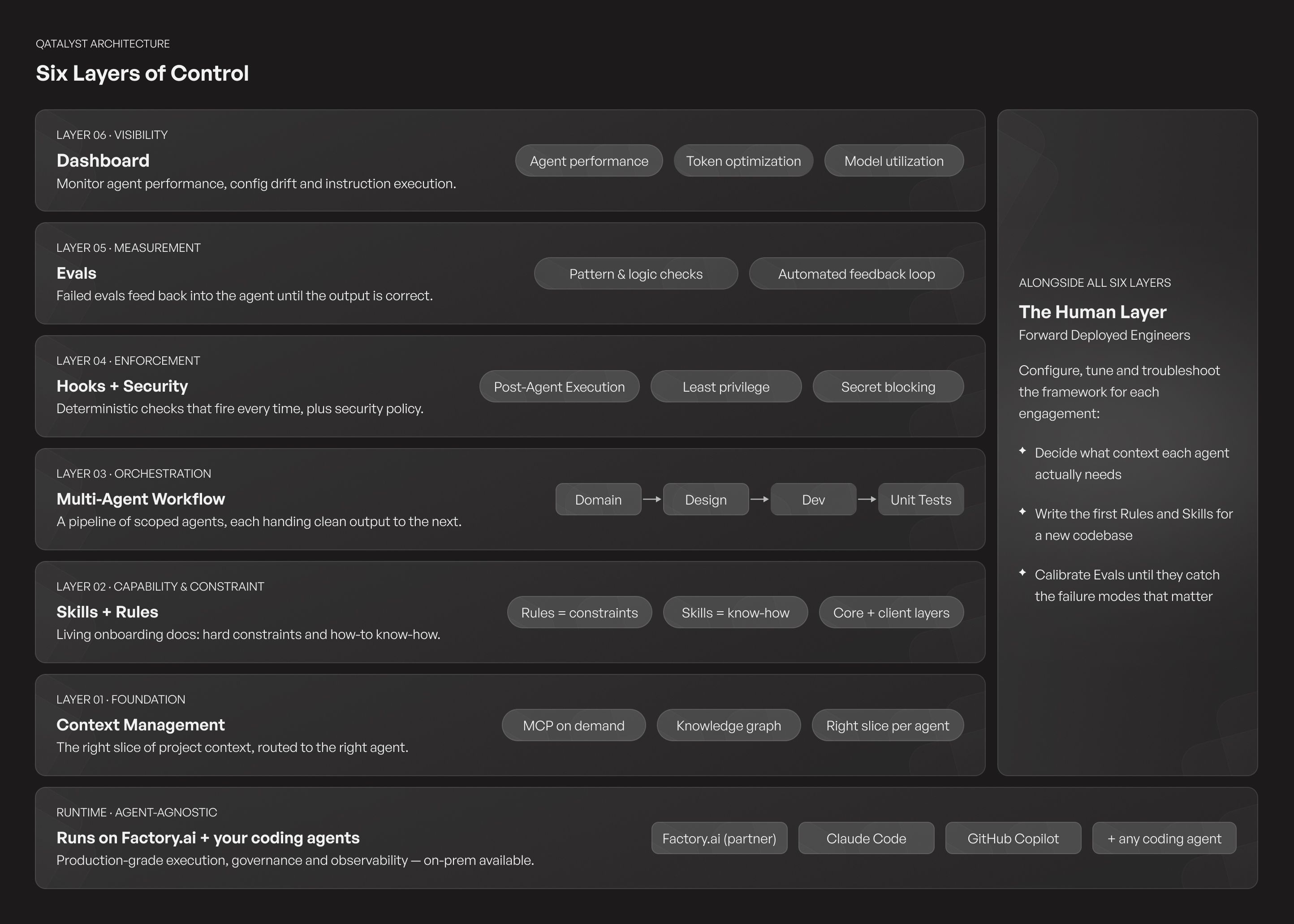
Each layer of Qatalyst governs a specific dimension of how agents operate inside an enterprise codebase.
1. Context Management (Foundation)
An agent is only as good as the context it is fed, and every role in the workflow needs a different view of the work. Within a single feature, a ticket-analysis agent needs the business requirement, a development agent needs implementation instructions, and a testing agent needs acceptance criteria. Handing an agent irrelevant details—or missing the ones it actually needs—hurts output almost as much as giving it no context at all.
Qatalyst uses the Model Context Protocol (MCP) to pull context from external sources on demand, which matters most in microservice architectures where one service's agent needs to understand another. Beyond per-task context, a knowledge base—a structured, traversable graph of project metadata—captures architecture, dependencies, and decision history that no single ticket would ever surface on its own.
2. Skills + Rules (Capability & Constraint)
Rules and Skills function as living onboarding documentation for the agent.
Rules enforce hard constraints an agent must never violate. For example, every .cs file namespace follows a fixed pattern; Entity Framework uses AsNoTracking for read-only queries.
Skills teach agents how to execute a task based on prior project learning: a testing agent verifies acceptance criteria before writing a test case; a development agent understands the architecture before generating code.
Skills carry two layers:
- Qatalyst Core refined across multiple engagements.
- Client-Specific Adaptation, built during the engagement itself—and depending on IP terms, sometimes owned by the client rather than QBurst.
3. Multi-Agent Workflow (Orchestration)
Asking a single agent to handle design, development, and testing at once rarely works well. Context windows fill up quickly, and not every instruction in that window is relevant to the task at hand. Instead, Qatalyst runs a pipeline of scoped agents, each handing off clean outputs to the next:
- Domain: Interprets the business context and core requirements.
- Design: Pulls specifications from Figma via MCP and translates them into development-ready UX guidance.
- Dev: Generates the implementation, splitting into specialized frontend and backend sub-agents where needed.
- Unit Tests: Validates the generated behavior directly against the business specification.
A pipeline of scoped agents is repeatable across developers and clients. It doesn't depend on any one person's prompting skill.
4. Hooks + Security (Enforcement)
Language models are probabilistic; Hooks bring the deterministic control needed to keep them predictable. An instruction like "run lint after the dev agent finishes" is advice an agent can skip. A Hook configures it as a Post-Agent Execution event that fires every time.
Hooks also enforce security policy, verifying least-privilege access, blocking leaked secrets, and catching unsafe code patterns before anything moves downstream. This is also where enterprise data-handling policies and third-party model exposure are strictly governed.
5. Evals (Measurement)
Traditional unit tests confirm a developer’s code solves the right business problem; Evals do the same job for agent-generated code, because a probabilistic system left unchecked can silently ship the wrong implementation.
When an output fails an Eval, the system feeds that failure back into the agent in an automated loop until the output is correct. That closed feedback loop is what turns AI generation into trustworthy production engineering.
6. Dashboard (Visibility)
Engineering teams can monitor agent performance, configuration drift, and instruction execution from one place.
Beyond operational oversight, the Dashboard tracks two critical economic levers:
- Token Optimization tracks where tokens are generated and spend, ensuring compute is spent where it improves code quality rather than minimized spend for its own sake.
- Model Utilization tracks a multi-model approach: each agent runs on the model best suited to its job.
Running Qatalyst at Enterprise Scale
Two things make the six layers work in production: a runtime that handles execution at enterprise scale, and a dedicated engineering team that tunes every layer to your specific codebase.
Powered by Factory.ai
Qatalyst partners with Factory.ai, an agentic coding platform built around managed agents (Droids) with production-grade execution, governance, and observability already built in. Instead of building that runtime layer from scratch, Qatalyst plugs into it, freeing engineers to focus on what only they can do. Factory.ai also supports on-prem deployment for clients whose data residency or security constraints rule out a fully managed, cloud-only runtime.
The Human Layer: Forward Deployed Engineers
Sitting alongside all six layers is a human one: people who make the other six work in practice. Forward Deployed Engineers (FDEs) configure, tune, and troubleshoot the framework for each engagement: deciding what context an agent actually needs, writing the first Rules and Skills for a new codebase, and calibrating Evals until they catch the failure modes that matter for that specific team. Because it is the same dedicated FDE team operating across every QBurst engagement, lessons learned on one codebase directly strengthen how the framework is deployed on the next.
Results in the Field
In a recent engagement with an investment company in South Africa, we measured requirements, design, and code-generation effort across two product workstreams, evaluating every activity against the same manual-effort baseline.
| Activity Category | Manual Effort | Agentic Effort | Time Saved |
| Backend Business Logic Implementation | 6–30 hrs | 3–14 hrs | 50–67% |
| Screen-level Implementation | 20–32 hrs | 12–17 hrs | 30–56% |
| Average—Code Generation | ~51% |
The contrast between the two categories highlights how deterministic guardrails actually behave in production. Rules-heavy backend logic—such as exception handling and field validation—saw peak time savings of up to 67% because explicit business rules and architectural constraints leave little room for ambiguity.
Detail-heavy UI screens saw more modest, though still substantial, gains of 30–56%, reflecting the finer visual adjustments that still require human judgment. Both were measured the same way, against the same manual-effort baseline.
Stop Prompting. Start Engineering the Harness.
Left to individual habits, AI coding tools will always amplify the variance you already have, giving you brilliant output on one desk, silent production bugs on the next, and unused potential everywhere else. You can't prompt your way out of an architectural gap.
If you want AI delivery to hold up at enterprise scale, you have to treat code generation like any other production system: governed by explicit constraints, backed by deterministic checks, and calibrated to your actual codebase. That is what Qatalyst is built to do: turning ad-hoc AI usage into a repeatable engineering standard.
Bring your codebase; we'll show you where the gains are. Request a codebase assessment to get started.